
Documentation Index
Fetch the complete documentation index at: https://docs.monk.com/llms.txt
Use this file to discover all available pages before exploring further.
Prepaid Credits
Monk supports a Prepaid Credit Wallet system that allows customers to prepay for usage-based charges. Prepaid credits are stored per contract and automatically applied to usage-based line items throughout the billing period.Prepaid Credits vs Credit Memos: Prepaid credits only apply to usage-based
charges and are deducted in real-time. Credit
Memos are a separate feature for post-billing
adjustments to any invoice line item.
How Prepaid Credits Work
Prepaid credits are managed as an immutable ledger of entries per contract:| Entry Type | Description |
|---|---|
| Grant | Add credits to the wallet (manual or automatic) |
| Usage | Deduct credits when applied to an invoice |
| Adjustment | Manual correction to the balance |
| Reversal | Undo a previous entry |
| Expiration | Credits expired (unused balance becomes breakage revenue) |
Credit Application Flow
Credits are applied continuously throughout the billing period in near-real-time: Key behaviors:- Credits are deducted in near-real-time as usage comes in
- Partial deductions allowed — if 80 usage, deduct $50
- Wallet depletion triggers a Slack alert immediately
- Overages accumulate on the invoice until billing cycle end
What Prepaid Credits Apply To
| Line Item Type | Prepaid Credits Applied? |
|---|---|
| Usage-based (metered) | ✅ Yes |
| Fixed/Flat fees | ❌ No |
| Subscription fees | ❌ No |
| Tiered pricing (non-usage) | ❌ No |
Credit Units and Exchange Rates
Monk supports optional credit unit tracking alongside dollar amounts. When granting credits, you can specify both the dollar amount and the number of credit units.How It Works
Each grant stores:- amountCents — Dollar value in cents (e.g., 50000 = $500)
- creditAmount — Number of credit units (e.g., 1562.5 credits)
- creditRateCents — Exchange rate, auto-computed as
amountCents / creditAmount
Why Track Credit Units?
Credit units let you present balances in a customer-friendly way:| Scenario | Without Units | With Units |
|---|---|---|
| Balance display | ”$350.00 remaining" | "1,093 credits remaining” |
| Usage tracking | ”$15.00 deducted" | "468 credits used” |
| Invoicing | ”Credits: -$15.00" | "468 credits @ $0.032” |
Credit units are optional. If you omit
creditAmount, the grant is
dollar-only and the credit balance will be null.Rate Stored Per Grant
Each grant captures its own exchange rate at time of creation. This allows:- Different grants to have different rates (promotional vs. paid)
- Historical accuracy for audit trails
- Correct dollar calculations when deducting from mixed-rate grants
Promotional Credits
Promotional credits are free credits granted at $0 cost — perfect for sign-up bonuses, referral rewards, or goodwill gestures.How Promotional Credits Differ
| Aspect | Paid Credits | Promotional Credits |
|---|---|---|
amountCents | > 0 (cost basis) | 0 (no cost) |
isPromotional | false | true |
| Deduction priority | After promotional | First |
| Expiration breakage | Revenue recognized | No revenue |
POST /v1/contracts/{contractId}/credits/promotional/grant is
promotional-only. Monk marks the grant as promotional automatically.Credit Expiration
Credits can have an expiration date (expiresAt). After this date:
- Credits cannot be used for deductions
- Remaining balance is written off
- An
expirationentry is created in the ledger - Breakage revenue is recognized (for paid credits only)
Breakage Revenue
When paid credits expire unused, Monk recognizes breakage revenue — the deferred revenue becomes earned revenue. This follows standard revenue recognition principles. Paid credits are typically configured via contract creation or dashboard workflows.Expiration Processing
Expired credits are processed by a nightly cron job:- Find all grants past their
expiresAtdate - Calculate remaining balance for each expired grant
- Create an
expirationledger entry (negative amount) - Record breakage revenue in general journals (paid credits only)
Deduction Priority
When a contract has multiple credit grants, usage is deducted in this order:- Soonest expiring — Use credits before they expire
- Promotional first — Preserve revenue recognition for paid credits
- Lowest cost basis — Cheaper credits (lower rate) before expensive
- Oldest first (FIFO) — Fair ordering for same-priority grants
Block-Level Tracking
Each usage entry includes agrantEntryId linking it to the specific grant it was drawn from. This enables:
- Full audit trail of which grants funded which usage
- Verification that FIFO ordering is correct
- Accurate per-grant balance calculations
Meter-Scoped Grants
By default, a credit grant applies to all usage-based charges on a contract. With meter-scoped grants, you can restrict a grant to specific meters — useful when different types of usage have different credit rates or when you want to offer targeted promotional credits.How It Works
Each grant can includespecifiers with a list of meterIds. When credits are deducted, only grants whose specifiers match the usage meter are considered:
| Grant Specifiers | Behavior |
|---|---|
null (no specifiers) | Applies to all usage (catch-all) |
{ meterIds: ["meter-A"] } | Only applies to usage from meter A |
{ meterIds: ["meter-A", "meter-B"] } | Applies to usage from meter A or B |
Catch-all grants (no specifiers) are always eligible for deduction regardless
of which meter generated the usage.
Example: Multi-Product Credits
A customer has two products billed through different meters — Recruiting (50/credit):Viewing Specifiers
Thespecifiers field is returned on credit blocks in the Get Credit Balance response and on grant entries in the Get Credit Ledger response, so you can always see which meters a grant is scoped to.
Credit Usage Statement
For invoices where credits were applied, Monk can generate a Credit Usage Statement — a supplementary PDF document showing credit consumption details. This is separate from the monetary invoice and provides:- List of all credit usage entries for the invoice
- Timestamp and description for each deduction
- Promotional vs. paid credit breakdown
- Total credits consumed
- Wallet balance after invoice (as of the invoice date)
The Credit Usage Statement is available via API at `GET /v1/invoices//credit-report`.
When to Use Credit Statements
| Scenario | Invoice Shows | Credit Statement Shows |
|---|---|---|
| $0 invoice (fully covered) | $0 due | All credit consumption details |
| Partial credits | Credits as line deduction | Breakdown by grant block |
| Audit/reconciliation | Total credits applied | Entry-level detail |
Prepaid Credit Settings
Each contract can have prepaid credit wallet settings configured:| Setting | Description |
|---|---|
| On Depletion | End-of-cycle behavior: auto_invoice (send invoice) or alert_only (hold invoice for review) |
| Min Top-up Amount | Minimum amount for credit top-ups |
| Currency | Credit currency (defaults to USD) |
Depletion Behavior
TheonDepletion setting controls what happens at the end of the billing cycle when the wallet was depleted:
| Setting | On Depletion (mid-cycle) | At Billing Cycle End |
|---|---|---|
| Auto Invoice | Slack alert + webhooks, usage continues to accrue | Invoice sent for overage amount |
| Alert Only | Slack alert + webhooks, usage continues to accrue | Invoice held, second alert sent |
Both modes always deduct all available credits. The setting only affects
whether the remaining invoice is sent automatically or held for manual review.
- System deducts $100 (wallet depleted), Slack alert sent
- Invoice shows $20 remaining
- Auto Invoice: $20 invoice sent at cycle end
- Alert Only: $20 invoice held, alert sent for manual action
Alerts & Thresholds
Monk provides configurable alert thresholds to help you monitor prepaid credit wallet status proactively.How Threshold Alerts Work
Alert thresholds are configured as percentages of the High-Water Mark (HWM) — the maximum balance ever reached in the wallet. This auto-scales with customer growth without requiring manual reconfiguration.| Concept | Description |
|---|---|
| High-Water Mark | Maximum wallet balance ever reached (updates on top-ups that exceed it) |
| Alert Thresholds | Percentage levels that trigger alerts (e.g., 25%, 10%, 0%) |
| Partial Reset | When balance increases, only thresholds recovered past are re-armed |
Example Walkthrough
Starting with HWM = $10,000 and thresholds at 25%, 10%, 0%:| Event | Balance | % of HWM | Alert Fired | Notes |
|---|---|---|---|---|
| Initial grant | $10,000 | 100% | — | HWM set to $10K |
| Usage depletes to $2,000 | $2,000 | 20% | 25% threshold | Below 25% |
| More usage to $500 | $500 | 5% | 10% threshold | Below 10% |
| Top-up to $1,500 | $1,500 | 15% | — | 10% and 0% thresholds reset |
| Usage back to $500 | $500 | 5% | 10% threshold | Re-fires (was reset) |
| Fully depleted | $0 | 0% | 0% threshold | Wallet depleted |
Partial reset behavior: When you top up, only thresholds you’ve recovered
past are reset. In the example above, topping up to 15% resets the 10% and
0% thresholds (since 15% > 10%), but 25% stays “alerted” since you’re still
below it.
Alert Channels
| Channel | Description |
|---|---|
| Slack | Alerts sent to team members with credit wallet notifications enabled |
| Webhooks | credit.threshold_crossed and credit.balance_depleted events |
Configuring Thresholds
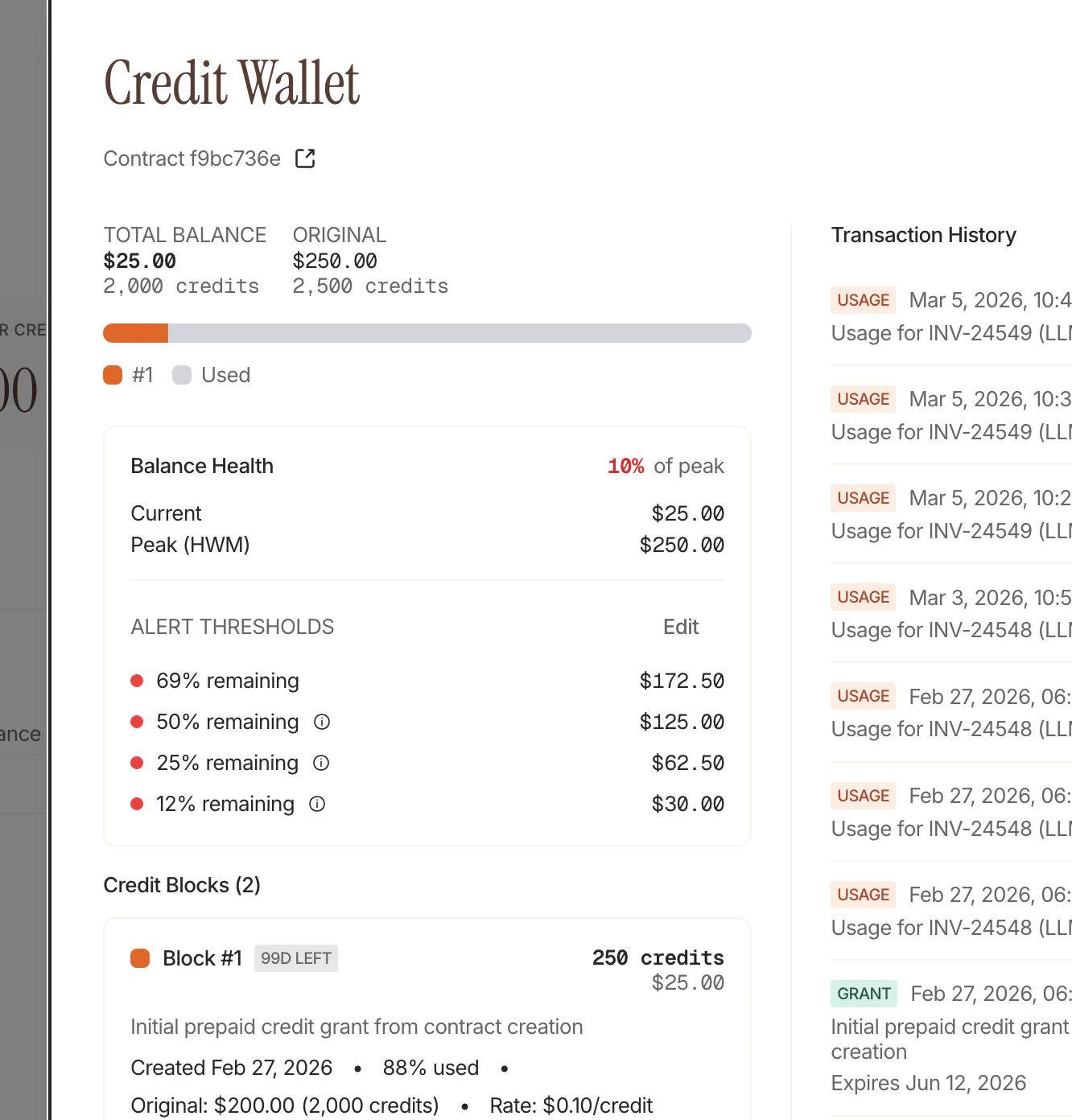
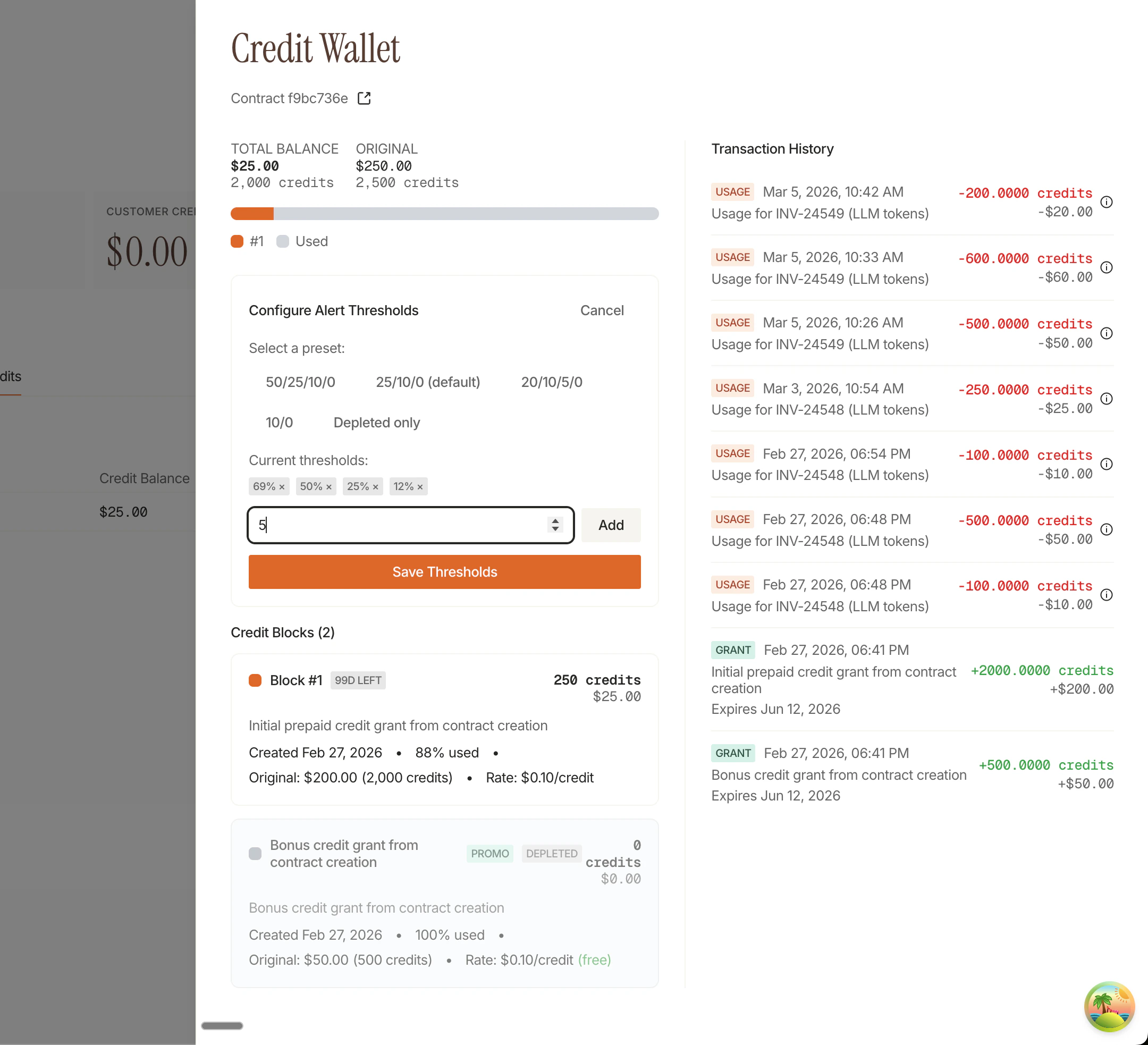
Thresholds can be configured in the Credit Wallet settings:- Preset options: 50/25/10/0%, 25/10/0% (default), 10/0%, or custom
- Custom thresholds: Add any percentage from 0-100%
- Per-contract: Each contract can have different threshold configurations
Webhook Events
Subscribe to credit events for programmatic integrations:| Event | When Triggered |
|---|---|
credit.threshold_crossed | Balance drops below any configured threshold |
credit.balance_depleted | Balance reaches $0 (special case of above) |
Slack Alerts
| Alert | When Triggered |
|---|---|
| Threshold Alert | Balance drops below a configured threshold |
| Invoice Held | End of cycle, alert_only mode, invoice needs review |
Credit Budgets
Credit budgets let you set per-dimension spending caps on shared credit pools. For example, if multiple brands share one credit wallet, you can cap how much each brand is allowed to consume.How Budgets Work
Each budget is defined by:| Field | Description |
|---|---|
| Label | Human-readable name (e.g., “Dove”) |
| Event Property Key | The event property used to partition usage (e.g., “brand”) |
| Event Property Value | The specific value this budget tracks (e.g., “Dove”) |
| Max Credits/Amount | The spending cap (in credits or dollars) |
| Credit Type (Meter) | Optional — scope the budget to a specific meter |
Budgets are spending limits, not reservations. All dimensions share the
same credit pool. If one dimension uses less than its cap, others can still
consume from the shared pool.
Example
A shared wallet with $50,000 in credits, partitioned bybrand:
| Budget | Event Property | Cap |
|---|---|---|
| Dove | brand=Dove | $20,000 |
| Axe | brand=Axe | $15,000 |
| Lux | brand=Lux | $15,000 |
credit.budget.exhausted webhook fires. The overall wallet continues to function — only Dove’s budget is flagged.
Webhook Event
| Event | When Triggered |
|---|---|
credit.budget.exhausted | A dimension’s usage reaches its configured cap |
Managing Prepaid Credits
Prepaid credits can be managed through both the Monk Dashboard and the API.Via Dashboard
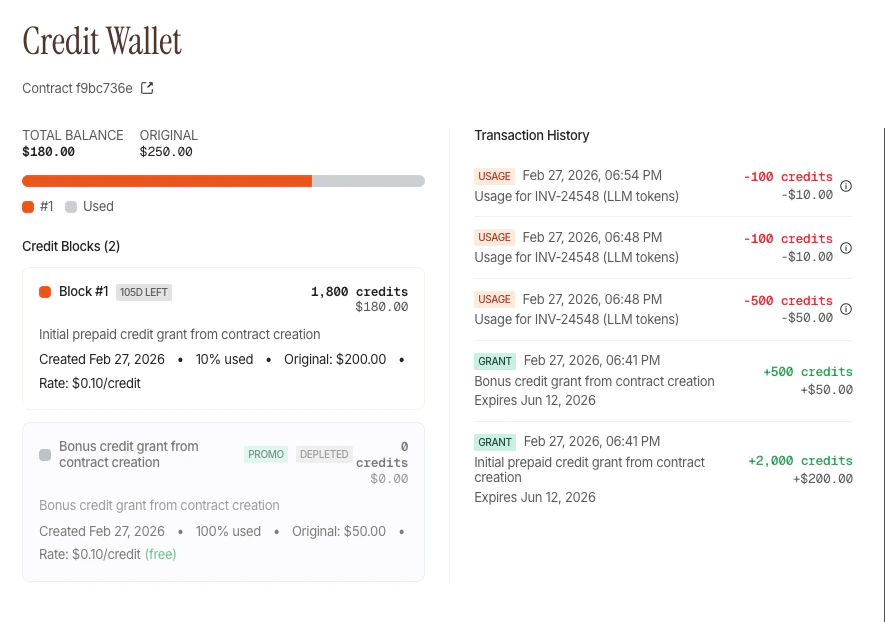
- Navigate to Customers in your Monk dashboard
- Select the customer and their contract
- View the prepaid credit balance and ledger history
- Grant or adjust credits as needed
Via API
The Prepaid Credits API allows you to programmatically manage credit wallets:| Endpoint | Description |
|---|---|
GET /v1/contracts/{id}/credits/balance | Get current balance and credit blocks |
GET /v1/contracts/{id}/credits/ledger | Get full credit ledger history |
POST /v1/contracts/{id}/credits/promotional/grant | Grant promotional credits |
GET /v1/invoices/{id}/credit-report | Credit usage statement (PDF) |
Public API grants are promotional-only. For paid prepaid grants, configure
creditGrantCents during contract creation or use dashboard workflows.Plan-Level Prepaid Credit Grants
You can configure default prepaid credit settings at the plan level, so every contract created from that plan automatically includes credits:- Initial credit grant: Set a default prepaid credit amount (e.g., “Pro plan includes $500 in prepaid credits”)
- On depletion behavior: Configure what happens when credits run out
- Override at contract creation: Override the plan defaults for specific customers via the Create Contract API
Use Cases
Prepaid Usage
Customers pay upfront for expected usage, credits are deducted as they
consume resources
Promotional Credits
Offer sign-up bonuses or referral rewards that apply to usage charges.
Promotional API grants are marked automatically.
Enterprise Commitments
Apply negotiated discounts as credits for committed usage. Set
expiresAt
for annual commitments.Goodwill Credits
Compensate customers for service issues by crediting their usage
Credit Memos (Separate Feature)
Credit Memos are a separate feature for post-billing adjustments and should not be confused with prepaid credits.| Feature | Prepaid Credits | Credit Memos |
|---|---|---|
| Purpose | Prepay for future usage | Adjust past invoices |
| Applies to | Usage-based charges only | Any invoice line item |
| Timing | Deducted in real-time during cycle | Applied after invoice is generated |
| Use cases | Prepaid plans, promotional credits | Refunds, billing corrections, goodwill |
| Managed via | Contract credit wallet | Invoice-level allocation |
Credit memos are available in the Monk Dashboard today. See Credit
Memos for more details.
Next Steps
How Usage-Based Billing Works
See how credits fit into the full billing flow
Grant Your First Credit
Step-by-step guide
Prepaid Credits Guide
End-to-end setup
Promotional Credits
Sign-up bonuses and referrals